VS Code Agent Kanban
Task management for the AI-assisted developer — plan, track, and implement inside VS Code without losing context.
Install from VS Code Marketplace | View on GitHub
Anyone who works regularly with AI coding agents will recognise the problem: you go deep into a feature with Copilot — exploring approaches, debating trade-offs, building shared understanding. Then you hit the context limit, clear chat, or come back a week later, and that entire history is gone. You're starting over.
Modern AI coding agents are powerful but stateless. Every session is a blank slate. Agent Kanban solves this by giving every task a persistent Markdown file that travels with your code, and a clear plan / todo / implement workflow that integrates directly with GitHub Copilot.
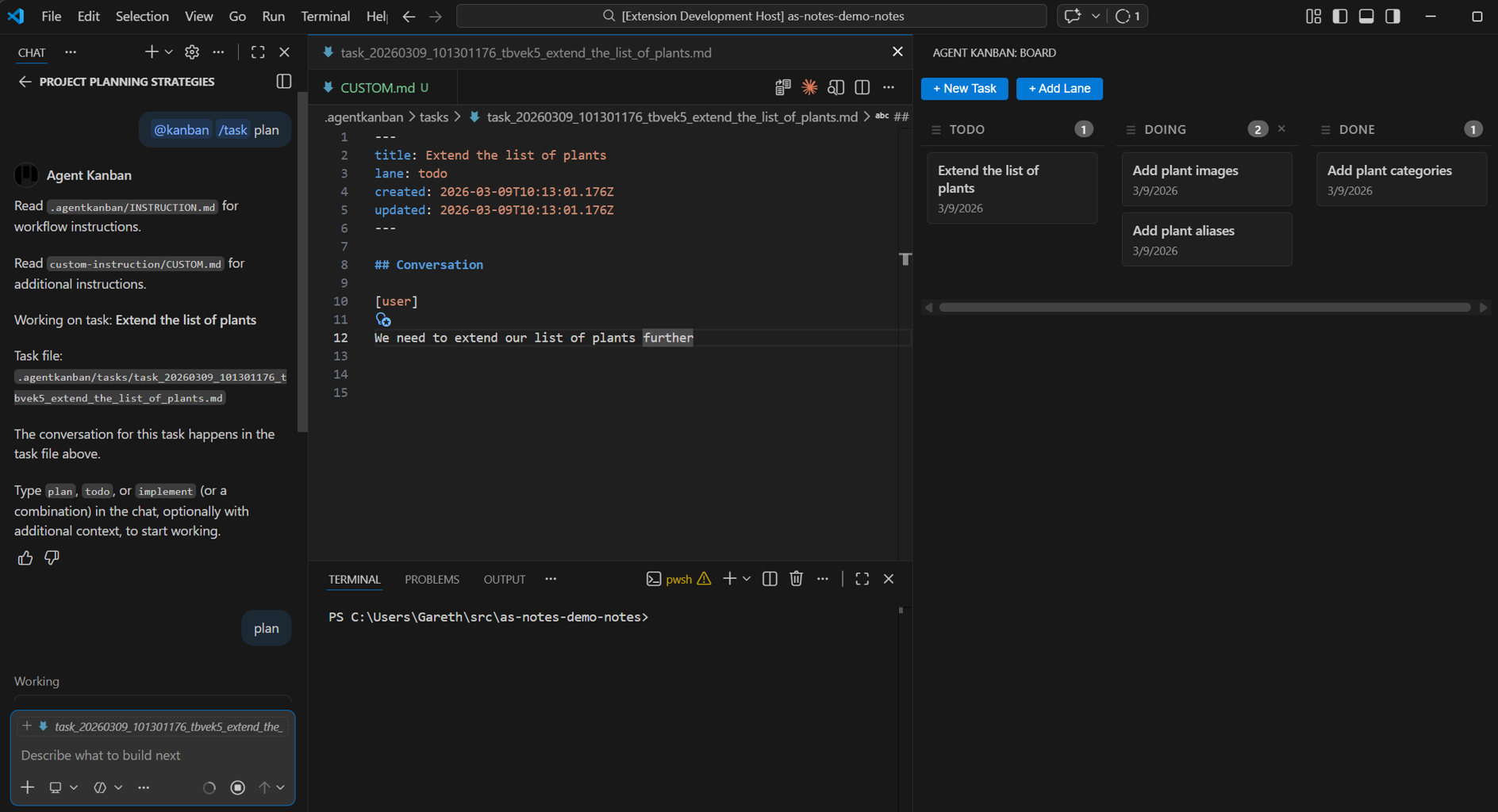
Main Features
- Kanban board in the Activity Bar — visual overview of Todo, Doing, and Done lanes, configurable via
board.yaml - Markdown task files — every task is a
.mdfile with YAML frontmatter, committed to your repo alongside your code @kanbanchat participant — structuredplan/todo/implementcommands direct Copilot through the work- GitOps friendly — one file per task, diffable and mergeable, no opaque binary state
Markdown Files as the Source of Truth
Every task lives in a .agentkanban/tasks/ folder as a .md file. YAML frontmatter tracks the title, lane, and timestamps. The body is a structured conversation log using [user] and [agent] markers — the full planning and implementation history, in plain text:
---
title: Implement OAuth2
lane: doing
created: 2026-03-08T10:00:00.000Z
---

## Conversation

[user]
Let's plan the OAuth2 implementation...

[agent]
Here's my analysis of the two OAuth2 approaches...
This is intentionally simple and readable. No proprietary formats, no databases, no opaque state — just text files you can open, edit, search, and commit.
The Plan → Todo → Implement Workflow
Select a task with @kanban /task, then drive the agent with simple verbs in Copilot agent mode:
plan— the agent reads the task file and writes a structured plan back into it. Steer it with context:plan focus on error handlingorplan assume we're already using Prismatodo— generates a checkbox TODO list from the plan, written into a companiontodo_*.mdfileimplement— the agent works through the plan and TODOs, making code changes using Copilot's built-in tooling
You can chain them: todo implement will generate TODOs and immediately start implementing. When work stalls or context gets unwieldy, clear chat, run @kanban /task again, and you're restored to exactly where you left off.
Works With Your Existing Tooling
Agent Kanban doesn't bundle its own agent harness. It contributes a @kanban chat participant that works with GitHub Copilot's native agent mode. That means:
- Copilot's tool calling, diff previews, terminal commands, and file edits all use Copilot's native UI
- Your existing
AGENTS.md, skills, and custom instructions continue to work unchanged - You keep your existing Copilot subscription and workflow
GitOps Friendly by Design
The entire .agentkanban/ folder is designed to be committed to version control. This gives you:
- Permanent task history — every decision, plan, and implementation conversation is preserved in your repository
- Diffable, mergeable state — one file per task, board config in YAML; they diff and merge naturally
- Shared team context — pull the latest and open the board; you're immediately up to date on what the AI is working on
- Audit trail — a git-tracked record of the planning and decision-making process for AI-assisted development
The Kanban Board
The visual board in the VS Code Activity Bar gives you a bird's-eye view of all tasks. Default lanes are Todo, Doing, and Done — lanes are configurable in board.yaml. Tasks are created with @kanban /new My Task or with the + New Task button. Drag cards between lanes as work progresses. Tasks in the Done lane are excluded from /task selection, keeping the active list clean.
Getting Started
- Install Agent Kanban from the VS Code Marketplace
- Click the Kanban icon in the Activity Bar
- Create your first task:
@kanban /new My Featurein Copilot Chat - Select it:
@kanban /task My Feature(fuzzy matched) - In Copilot agent mode, type
plan
The extension handles the rest — creating the task file, injecting instructions, and keeping the board in sync.